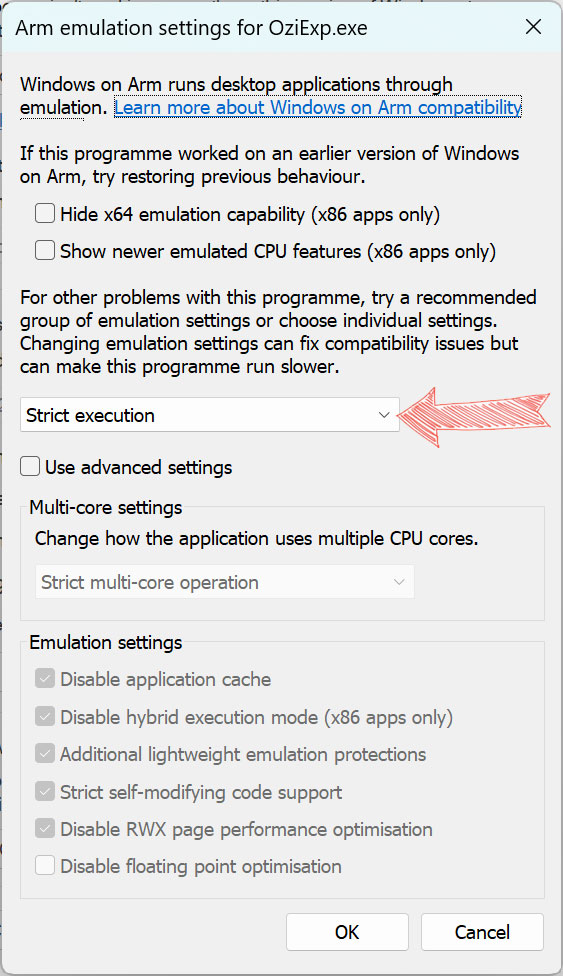
Users may have found they get an error when trying to open Oziexplorer on a new laptop or tablet PC. This error is because a number of newer Windows laptops and tablet PC’s are now using ARM processors which require different versions of the application or emulation inside Windows 11 to make them work.
When buying a new PC you should be aware of what processor architecture it uses but know that in most cases it will make little difference.
Should I buy an ARM PC?
As for July 2025 You should not have any real problems. The windows ARM emulation is very stable and capable of making most x86/x64 programs work. Most major applications are now being coded with ARM specific versions for the cleanest and fastest execution.
Some software will not allow you to install on an ARM device if they know there will be problems. I have heard that Ozi Explorer will not be updated for native ARM but luckily it runs well under emulation with the tweak below.
The main advantage is power efficiency, cost-effectiveness, and devices with smaller form factors.
Battery life on the Surface Pro 11 for example is fantastic with the longest of flights on full brightness being no issue.
The fix
The good news is that Windows 11 has emulation for x86 and x64 programs on the ARM hardware.
1. Navigate to the oziexplorer folder on your computer. Typically C:\OziExplorer
2. Right click on the oziexp.exe file and select properties
3. Navigate to the Compatibility tab
4. Navigate to the Change Emulation Settings
5. Set “Strict Emulation”
6. Apply / Okay your way out of all the settings and it should all work now.
What about oziTarget?
I have not seen any compatibility issues with oziTarget on my ARM based Surface Pro. As far as I can tell this change is not needed for the oziTarget executable.